

By Julia W.
File Under Uncategorized

To pick the right video platform for your private practice, focus on these key areas:
Quick Tip: Test platforms with free trials to ensure they meet your practice’s needs. Consider client demographics, session types, and workflow requirements before committing.
| Platform | Free Plan | Paid Plan Starting Price | Key Features | Limitations |
|---|---|---|---|---|
| Doxy.me | Yes (1:1 only) | $35/month | BAA, HD video, custom branding | Free plan limited to one-on-one |
| Zoom Healthcare | No | $16.99/month/user | EHR integration, group sessions, BAA | Requires healthcare add-on |
| SimplePractice | No | $69/month | Integrated EHR, billing, client portal | Lower tiers exclude telehealth |
| Google Meet | Yes (no BAA) | $14/month/user | BAA, noise cancellation | Compliance requires Business+ plan |
When selecting a platform, prioritize compliance, ease of use, and integration with your current tools to simplify operations and enhance client satisfaction.
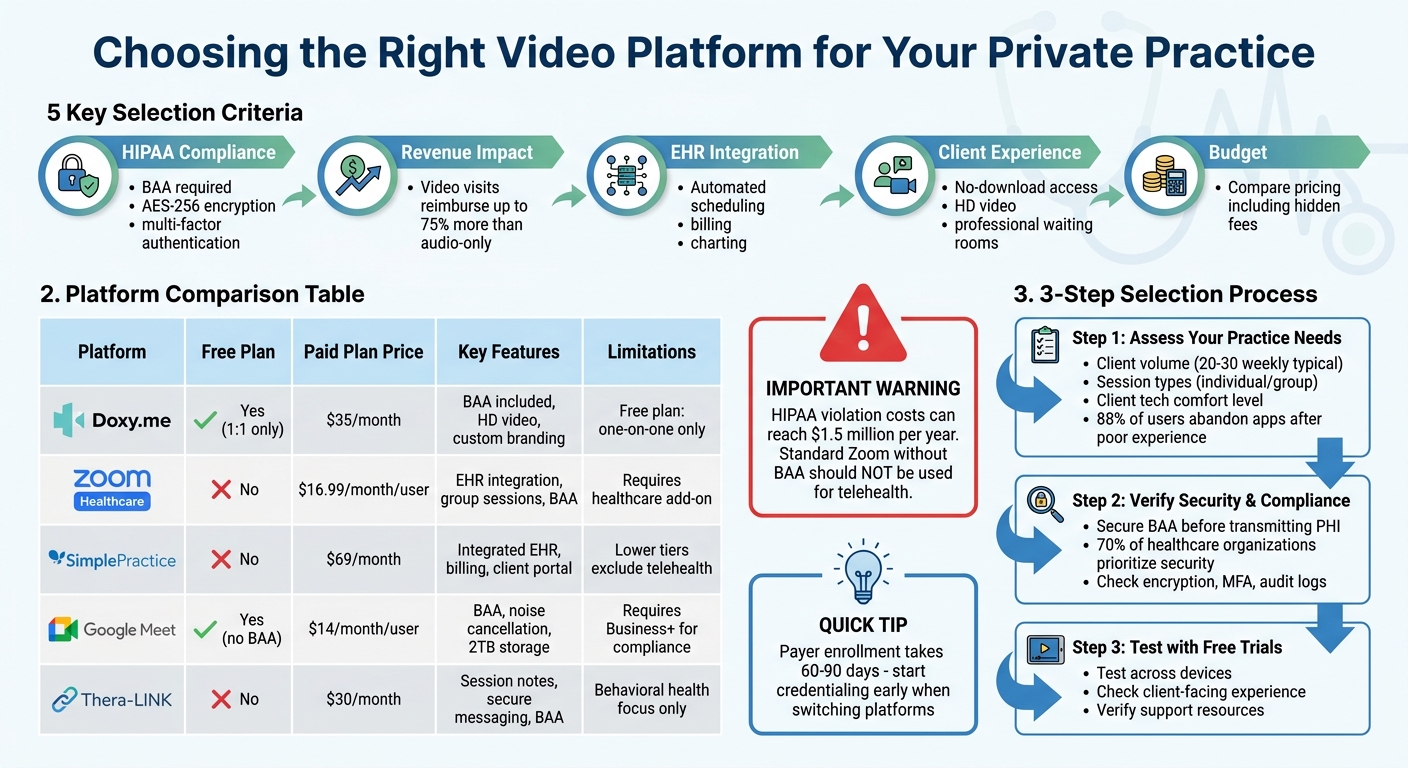
Video Platform Comparison for Private Practice: Features, Pricing & HIPAA Compliance
When choosing a video platform, it’s important to prioritize compliance, session quality, and streamlined administration.
A signed Business Associate Agreement (BAA) is non-negotiable. This contract must be in place before transmitting any protected health information (PHI).
Make sure the platform includes AES-256 encryption, multi-factor authentication, and audit logs. For the highest level of security, look for end-to-end encryption (E2EE) – this ensures even the platform provider cannot access session content.
"The cost of a single HIPAA violation can reach $1.5 million per year, making robust security features non-negotiable." – Faheem Shah, Altegon
Disable features like cloud recording or live transcription unless explicitly covered by the BAA. Additionally, use tools like virtual waiting rooms and passcodes to control access.
While security is critical, technical performance plays an equally vital role in delivering effective sessions.
High-quality video and audio are essential for clinical accuracy and patient satisfaction. Look for platforms that support high-definition video – at least 720p, though 1080p is ideal – and keep audio latency under 150ms to ensure smooth, real-time conversations. Poor quality can lead to diagnostic errors and lower patient trust.
From a financial perspective, audio-only visits often reimburse at just 60–75% of video visit rates, so reliable video quality directly impacts your revenue. Platforms with adaptive streaming technology are especially helpful, as they adjust video quality based on the client’s internet connection, minimizing interruptions.
Once security and quality are addressed, integration becomes the next priority. Disconnected workflows can lead to wasted time and billing mistakes. The best platforms integrate seamlessly with Electronic Health Records (EHR) using HL7 or FHIR protocols, letting you launch sessions directly from patient charts. This integration eliminates redundant data entry and ensures notes, billing, and insurance claims are synchronized.
Look for features like:
Some platforms even offer AI charting assistants that handle note summaries and dictation, significantly reducing post-session administrative workload.
Lastly, remember that payer enrollment for telehealth can take 60–90 days, so if you’re switching platforms, start the credentialing process early to avoid gaps in reimbursement.
To build on the platform features we’ve covered, it’s essential to establish strong daily security practices to safeguard client data. While a signed BAA (Business Associate Agreement) shifts liability to the vendor in the event of a breach, you’re still responsible for ensuring your implementation aligns with HIPAA requirements.
Certain features, if left enabled, can pose compliance risks. For example, cloud recordings, AI transcriptions, and live chat logs might inadvertently store PHI (Protected Health Information) unless explicitly included in your BAA. Even encrypted video isn’t entirely risk-free – metadata, like call participants and timestamps, is often logged by vendors and can qualify as PHI. Before enabling any features, confirm which ones are covered under your BAA. These adjustments not only help meet compliance standards but also make your daily operations more efficient.
Access control is another cornerstone of security. Use tools like two-factor authentication (2FA), session timeouts, and virtual waiting rooms to verify identities. Avoid public Wi-Fi networks, and always use a VPN for added protection. Additionally, ensure no PHI is stored locally on devices once a session concludes. These steps help keep sessions secure while maintaining the trust your clients place in your practice.
Regular audits are equally critical. HIPAA mandates that platforms track who accessed the system, along with timestamps and locations. Reviewing activity logs periodically ensures that only authorized personnel are accessing sensitive data and can help identify potential issues early. Considering that about 70% of healthcare organizations rank security as the top priority when choosing a telehealth platform, these practices are essential for protecting both your clients and your practice.
Once you’ve secured an integrated platform, the next step is comparing costs to ensure you’re making a smart investment. It’s important to balance the features you need with the price, while also being mindful of any hidden fees. This cost evaluation builds on earlier considerations of security and performance.
Many platforms use tiered pricing models, but don’t assume HIPAA compliance is included in the base plan. For example, Google Meet’s Business+ plan starts at $14/month, and Zoom’s Healthcare add-on costs $16.99/month per user. These upgrades are necessary for HIPAA compliance. A standout option is Doxy.me, which offers a Business Associate Agreement (BAA) even on its free plan for one-on-one visits.
"The standard Zoom product without a BAA should not be used for telehealth – this is a common compliance error in practices that started using Zoom during COVID without upgrading to the healthcare tier."
You should also consider additional costs like integration and transaction fees. Platforms such as SimplePractice, which includes built-in billing, often charge for credit card processing. If your practice involves serving clients across state lines, you may need to budget for multi-state licensure fees and potential increases in malpractice insurance premiums. Additionally, payer enrollment for telehealth services can take 30 to 90 days and may involve administrative expenses.
For practices with high patient volumes, investing in platforms with automation features can improve your return on investment.
| Platform | Starter/Free Plan | Professional/Mid-Tier | Enterprise/Clinic | Core Features (Paid) | Limitations |
|---|---|---|---|---|---|
| Doxy.me | $0 (1:1 visits, BAA included) | $35/month | Contact for pricing | Waiting room, HD video, custom branding | Free plan limited to one-on-one sessions |
| Zoom for Healthcare | N/A | $16.99/month per user | $200+/month | EHR integration, group sessions, BAA | Requires Healthcare add-on; no clinical tools |
| SimplePractice | $29/month (no telehealth) | $69/month (Essential) | $99+/month (Plus) | Integrated EHR, billing, client portal | Lower tiers exclude telehealth features |
| Google Meet | $0 (no BAA) | $14/month per user (Business+) | $22/month per user (Enterprise) | BAA, 2TB storage, noise cancellation | Requires Business+ minimum for compliance |
| Thera-LINK | N/A | $30/month | Contact for pricing | Built-in session notes, secure messaging, BAA | Behavioral health focus only |
Choosing the right video platform goes beyond just meeting technical and compliance standards. It should also fit seamlessly into your practice’s workflow. This approach ensures smooth operations, adherence to regulations, and satisfied clients.
Start by identifying the specific needs of your practice. Think about your client volume, the types of sessions you offer (individual or group), and how your administrative setup operates. For instance, many private practitioners handle 20 to 30 clients weekly. If you already use an EHR system, you’ll want a platform that integrates with it.
Consider your client base as well. If you work with older adults or individuals who aren’t comfortable with technology, opt for a browser-based platform that avoids the hassle of software downloads. Keep in mind that 88% of users abandon apps after a poor experience. A straightforward interface can help improve session attendance and reduce no-shows. Also, think about whether you need features like screen sharing for reviewing documents or digital tools like whiteboards for educational purposes.
Once you’ve outlined your needs, the next step is to ensure potential platforms meet stringent security requirements.
Security is non-negotiable, especially in healthcare, where it’s a top priority for 70% of organizations. Before exchanging any protected health information (PHI), secure a Business Associate Agreement (BAA).
Look for platforms that offer robust encryption (like AES-256), multi-factor authentication, and detailed audit logs. Check whether the BAA is included in all pricing plans or only in higher-tier options – platforms such as Zoom and Google Meet, for example, reserve BAAs for their healthcare or enterprise plans.
Once you’ve confirmed the platform’s security measures, it’s time to test its performance in real-world scenarios.
Before making a commitment, use free trials to evaluate how the platform performs during actual use. Make sure your internet speed aligns with the platform’s minimum requirements.
Before a session, you should know how everything will operate and have some idea of how to troubleshoot.
During your trial, test the platform across different devices – desktop, tablet, and mobile. Pay attention to how easily clients can access session links and whether the interface is user-friendly enough to avoid wasting time troubleshooting during appointments. Additionally, review the platform’s support resources to ensure you can quickly find help if technical issues arise mid-session.
Blend virtual and in-person services by offering 2–3 face-to-face sessions weekly alongside telehealth. This hybrid model works well with the scheduling and integration tools mentioned earlier.
Before committing to a physical location, evaluate your client base to see how many are local and prefer in-person sessions. Start small – try a single day a week in a coworking therapy space to test demand without locking yourself into a long-term lease.
Flexible rental options, like those from Humanly, make this easier. They provide on-demand rentals – hourly, daily, or monthly – with furnished waiting areas and contemporary designs. Prices range from $2.50–$20.50 per hour or $50 per day. Pairing this with a video platform that coordinates both virtual and in-person sessions can simplify your workflow.
In-person spaces also encourage networking with other professionals. Humanly’s network supports peer consultations and includes an in-house referral system, helping your practice grow naturally.
For a seamless hybrid setup, choose a video platform that integrates with tools like Google Calendar or Microsoft Outlook, enabling one-click meeting access. If you host hybrid meetings, consider hardware like the Jabra PanaCast 50, which offers a 180° view to ensure everyone in the room is included.
When selecting a video platform, prioritize HIPAA compliance, seamless workflow integration, and an excellent client experience. Make sure to have a signed Business Associate Agreement (BAA) in place before starting any sessions. Beyond meeting compliance requirements, the platform should naturally align with your existing systems. For example, if you’re already using an Electronic Health Record (EHR) system, explore its built-in telehealth module first. This can save you the hassle of juggling scheduling, charting, and billing across multiple platforms. Such integration not only keeps your practice compliant but also simplifies day-to-day operations.
While pricing matters, it shouldn’t be the sole deciding factor. A low-cost platform that complicates logins or requires manual note entry could end up costing more in lost time and missed appointments.
"Choosing the wrong platform costs practices in lost productivity, compliance exposure, and patient friction." – GetPracticeHelp Editorial
If your practice combines virtual and in-person care, opt for a platform that syncs with your scheduling tools. Pairing telehealth with flexible physical spaces – like the hourly or daily rentals offered by Humanly – allows you to scale up or down based on client demand, without committing to a long-term lease.
To make an informed decision, use the criteria outlined in this guide. Check for strong security measures, test the patient-facing experience, and confirm that the platform supports the necessary billing codes and modifiers. The best platform won’t just meet compliance standards – it will simplify your workflow and elevate the client experience. By balancing these key factors, your practice can operate more efficiently while delivering exceptional care.
Before entering into a Business Associate Agreement (BAA), make sure the platform agrees to sign it and verify that they are HIPAA-compliant. A BAA is a legal contract that obligates the platform to safeguard Protected Health Information (PHI), which is essential for adhering to HIPAA regulations.
Telehealth platforms often include features like video recordings or transcripts that might unintentionally store Protected Health Information (PHI). These tools must adhere to HIPAA safeguards to maintain the privacy and security of sensitive data. It’s crucial to carefully review a platform’s data handling policies to ensure they align with the required standards for protecting such information.
When considering a platform switch, take advantage of its free trial or pilot program. This gives you the chance to test its features, security measures, and overall usability. To make the evaluation process more effective, involve a small, trusted group of clients or colleagues. Their feedback on the experience can provide valuable insights. If the trial meets your expectations, you can proceed with transitioning your client base, ensuring the process is both smooth and secure.